

Why Choose an Android Rugged Tablet PC for Your Business?
Choosing the right business tablet affects daily work, data accuracy, and employee safety. An Android Rugged Tablet PC is built for demanding environments where ordinary consumer devices may struggle. Warehouses, construction sites, delivery routes, and field-service teams often face dust, rain, vibration, and accidental drops. These conditions expose weaknesses quickly.
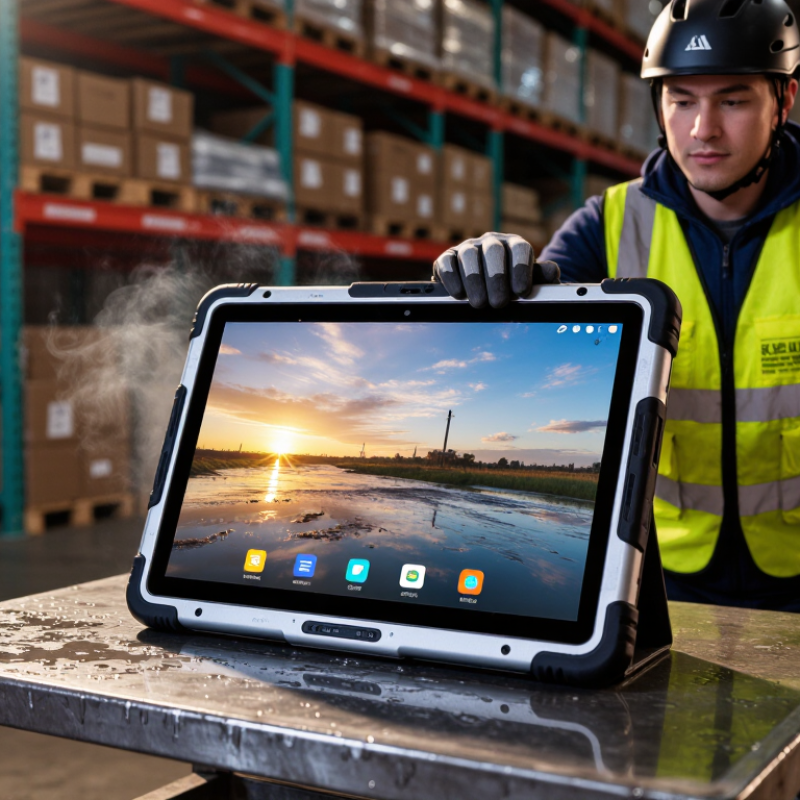
A RUGGED ANDROID TABLET combines familiar Android software with reinforced hardware. Its sealed housing can help limit dust and water exposure. A bright display improves visibility under direct sunlight. Glove-friendly touch support can reduce delays when workers wear protective equipment. Long battery options may support an entire shift, while barcode scanners, GPS, cameras, and cellular connections can reduce the need for separate tools. These features matter when a worker stands beside a loading bay at 6 a.m., recording a shipment in cold, wet weather.
However, rugged does not mean indestructible. Battery capacity, repair support, operating-system updates, accessory quality, and certification details require careful review. A low-cost model may appear attractive but create hidden expenses through downtime or difficult maintenance. Businesses should test the device with their actual software, gloves, mounts, and network conditions before making a purchase. It is a practical step. This guide examines durability, performance, security, usability, and total ownership costs. It also considers where an Android Rugged Tablet PC may be unnecessary. Honest evaluation matters, because the toughest-looking device is not always the best operational choice.
What Is an Android Rugged Tablet PC?
An Android rugged tablet PC is a mobile computer built for demanding work environments. It combines the Android operating system with a reinforced body, impact-resistant screen, and sealed ports. Many models resist dust, water splashes, vibration, and accidental drops. Their battery capacity often supports long shifts away from charging stations.
Unlike a standard consumer tablet, a rugged model is designed for practical field use. Warehouse staff can scan inventory beside loading docks. Technicians can view service records in dusty workshops. Delivery teams can capture signatures during changing weather. A bright display, glove-friendly controls, and reliable wireless connections can improve daily accuracy. However, rugged does not mean indestructible. Poor charging habits, extreme heat, or neglected maintenance can still cause failures. That is easy to underestimate.
Tips: Match the tablet’s protection rating to your workplace conditions. Check drop-test information, operating temperature, battery replacement options, and Android security support. Test the screen with gloves before purchasing. Also, measure the device with its case and vehicle mount installed. Small details matter. A powerful tablet may still feel inconvenient if workers cannot hold it comfortably for several hours. User feedback should guide the final choice, not specifications alone.
Why Choose an Android Rugged Tablet PC for Your Business? - What Is an Android Rugged Tablet PC?
An Android rugged tablet PC is a mobile computing device designed to run Android while providing enhanced protection against drops, dust, water, vibration, temperature changes, and demanding field conditions. The specifications below represent common business-oriented configurations and industry standards.
| Data Dimension | Typical Business Specification | Business Value | Important Considerations |
|---|---|---|---|
| Operating System | Android-based operating system with enterprise management support | Provides a familiar mobile interface, access to business applications, and flexible device deployment. | Check the supported Android version, security update policy, application compatibility, and device-management features. |
| Typical Screen Size | Approximately 8 to 12 inches | Balances portability with sufficient viewing space for forms, maps, inventory records, work orders, and dashboards. | Smaller screens improve one-handed use; larger screens may be preferable for detailed documents and vehicle-based work. |
| Display Brightness | Commonly about 500 to 1,200 nits | Improves readability in warehouses, logistics yards, construction sites, and outdoor work areas. | Actual outdoor visibility also depends on anti-glare treatment, viewing angle, ambient light, and screen reflectivity. |
| Touchscreen Operation | Capacitive touch with glove, wet-touch, or stylus support on selected configurations | Allows workers to operate applications while wearing gloves or working in wet or dusty environments. | Glove and wet-touch performance varies by design and should be tested with the gloves used in daily operations. |
| Ingress Protection | Often IP65, IP66, or IP67 | Helps protect internal components from dust and water exposure. | IP ratings have defined test conditions. IP67 generally includes temporary immersion protection, but it does not automatically indicate protection from every liquid or pressure condition. |
| Drop Resistance | Commonly tested for drops from approximately 1.2 to 1.5 meters, depending on the model and test method | Reduces the risk of downtime and repair costs caused by accidental drops during field work. | Drop results depend on the surface, device configuration, accessories, and test standard. A protective case may change the tested performance. |
| Environmental Testing | Selected models are tested against vibration, shock, humidity, and temperature extremes | Supports more reliable operation in transportation, manufacturing, utilities, public safety, and outdoor service environments. | Review the stated operating and storage temperature ranges before deployment in hot, cold, or rapidly changing conditions. |
| Battery Capacity | Typically about 5,000 to 12,000 mAh, with larger capacities available in some configurations | Supports longer shifts and reduces interruptions caused by frequent charging. | Battery life depends on screen brightness, wireless connectivity, processor load, GPS use, application behavior, and ambient temperature. |
| Replaceable Battery | Available on some business-focused rugged tablets | Enables battery swaps during shifts and can extend operational availability in remote locations. | Confirm whether spare batteries, charging docks, and safe replacement procedures are available for the intended deployment. |
| Wireless Connectivity | Wi-Fi, Bluetooth, and optional cellular connectivity; NFC and GNSS may also be available | Supports cloud applications, barcode scanners, headsets, location services, vehicle systems, and field communication. | Cellular availability, supported frequency bands, positioning accuracy, and network performance vary by configuration and region. |
| Data Capture | Optional barcode scanning, RFID, NFC, cameras, and GPS/GNSS | Improves inventory tracking, asset identification, proof of delivery, inspection records, and route coordination. | Integrated scanners may provide faster and more consistent scanning than a standard camera in high-volume workflows. |
| Processing and Memory | Multi-core mobile processor with approximately 4 to 8 GB of RAM and 64 to 256 GB of storage in common configurations | Supports business applications, browser-based systems, digital forms, communication tools, and local data storage. | Select capacity according to application requirements, offline data needs, encryption, and future software updates. |
| Security and Device Management | Screen lock, encryption, application controls, remote configuration, and Android enterprise management features | Helps protect business data and simplifies deployment, monitoring, updating, and policy enforcement across multiple devices. | Confirm support for mobile device management, kiosk mode, remote wipe, certificate management, and security updates. |
| Ports and Expansion | USB, charging interfaces, optional docking connectors, and sometimes expansion slots | Supports charging stations, external peripherals, desktop accessories, and vehicle-mounted workflows. | Rugged port covers can improve environmental protection but may affect cable compatibility and ease of access. |
| Ergonomics | Reinforced frame, textured grip, programmable keys, hand straps, and optional vehicle or desk mounts | Improves handling, reduces accidental drops, and supports efficient operation during repetitive tasks. | Evaluate weight, thickness, balance, button placement, and compatibility with gloves and mounting equipment. |
| Common Business Applications | Logistics, warehousing, field service, construction, manufacturing, utilities, transportation, healthcare, and public safety | Provides a single mobile platform for data collection, communication, inspection, navigation, work orders, and inventory control. | The best configuration depends on whether the primary workflow is scanning, documentation, navigation, communication, or real-time monitoring. |
| Total Cost of Ownership | Influenced by purchase price, accessories, repairs, battery replacement, software support, and downtime | A durable device may reduce replacement frequency and productivity losses in demanding operating environments. | Compare the complete deployment cost rather than evaluating hardware price alone. |
| Selection Guidance: Choose an Android rugged tablet PC by matching the device’s protection rating, battery strategy, connectivity, data-capture tools, security controls, mounting options, and software support period to the actual working environment. | |||